

The Deep Soil Sampling Visualization App: A New Tool for Making Soils Data Actionable
A new app turns soil test data into clear visual profiles and management guidance.
Author: Adam Peterson, WSDA
March 4, 2026
Soil testing is one of the most useful steps that you can take in nutrient management. It removes the guesswork and helps answer a basic but important question: what’s in my soil?
Lab results often arrive as a spreadsheet full of numbers that can be difficult to interpret. That's especially true for deep soil sampling, where data comes back from multiple depths. What do the results mean for different crops with different nutrient needs and different rooting depths? Without context, it's hard to know if nutrient levels are too much, not enough, or somewhere in between.
That's the problem the Deep Soil Sampling Visualization app (the DSS app, for short) was built to solve. You can access the tool here.
Turning Numbers into Something Useful
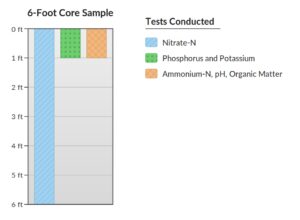
The DSS app was developed to support the Deep Soil Sampling Program run by the South Yakima Conservation District. The District collects multiple soil cores from fields across the Lower Yakima Valley, drilling down to six feet (or until hitting a layer that stops the drill). Each one-foot section is tested separately: Nitrate-nitrogen is tested at every depth; ammonium-nitrogen is tested in the top foot; and phosphorus and potassium are tested in the top two feet (Figure 1).
That's a lot of data from a single core! The app's job is to transform the data into something that can be read and understood quickly.
When a user enters their data, the app generates a vertical visual profile of each nutrient. Instead of scanning rows in a spreadsheet, they see a clear picture of what's going on vertically in the soil. Nitrogen levels are shown in pounds per acre and can be compared to the statewide range of possible nitrogen needs for their crop. Phosphorus and potassium levels are also shown relative to crop demand. In cases where one or both are elevated, users are linked to appropriate management resources.
The tool currently supports 26 different crops, a number which continues to grow.
Why Depth Matters
A big motivation behind the soil sampling program the DSS app is understanding what's happening with nitrate-nitrogen at various depths. Nitrate-nitrogen dissolves in water and can move downward through the soil when too much water is applied. This nitrate can eventually make its way below the crop’s root zone and into groundwater where it can be a contaminant.
In wetter climates, much of the nitrate-nitrogen at the end of the growing season is vulnerable to leaching from heavy winter rainfall. But in the arid locations, like the Lower Yakima Valley, significant amounts of nitrate-nitrogen can remain in the soil over winter.
Sampling at depth tells a story. Nitrogen found in the root zone is available to the crop, while nitrogen found below the root zone is not. Seeing a side-by-side breakdown can paint a picture of how past management decisions (irrigation, fertilizer type, and fertilizer application rates) have shaped what's in the soil today.
The app takes this a step further by estimating the dollar value of nitrogen below the crop’s root zone. That makes the cost of nitrogen loss tangible. If there's $250 worth of nitrogen sitting below where roots can reach, that's money already spent with no return. It's a simple but effective way to show why keeping nitrogen in the root zone matters.
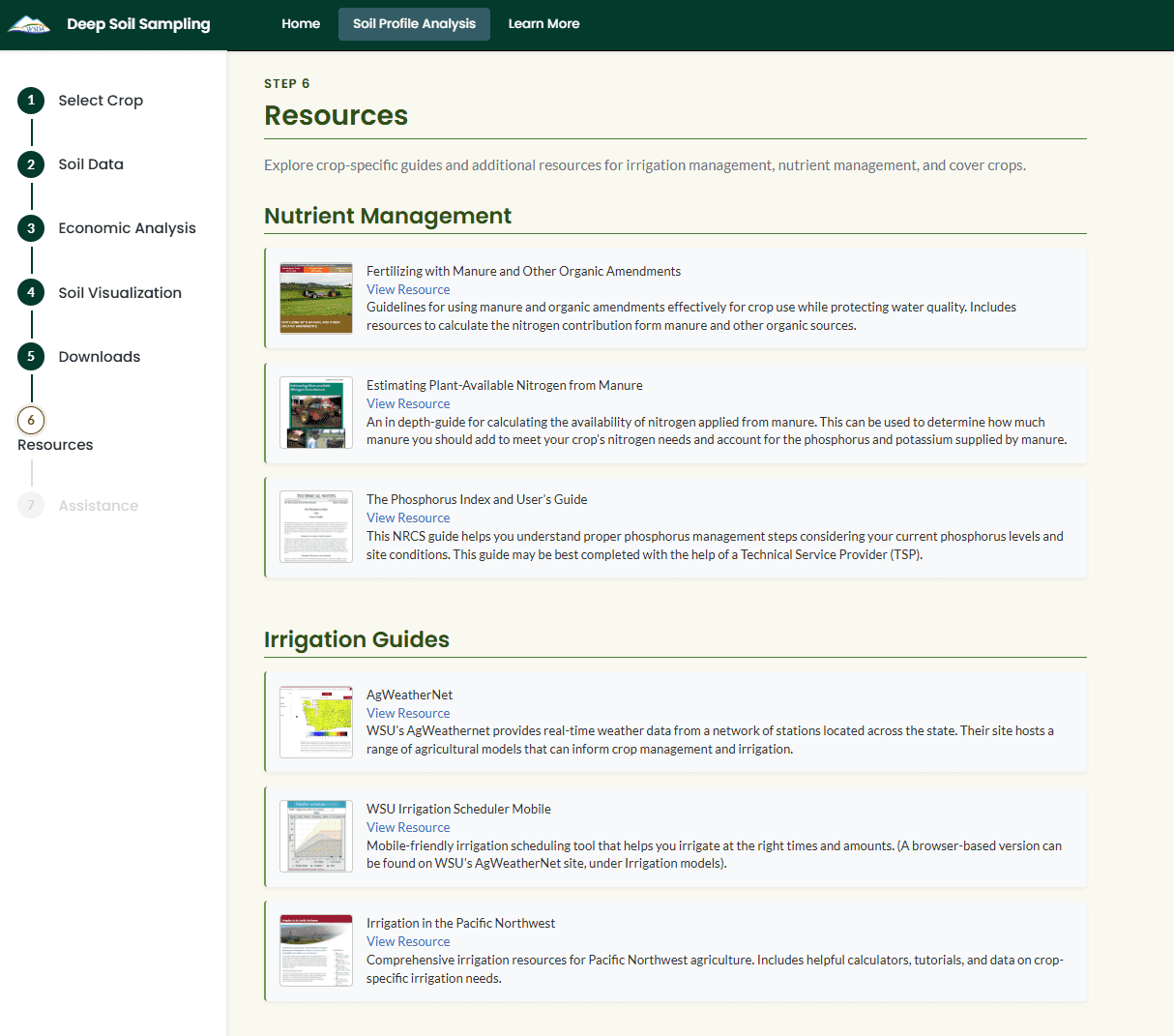
Beyond the visuals, the app offers nutrient-specific best practices. These are straightforward, practical recommendations: avoid over-irrigation to reduce leaching, consider the ratio of nutrients contained in fertilizers to avoid over-supply, and where possible, consider planting cover crops to scavenge end-of-season nitrate and reduce the risk of runoff. Curated resources from university extension programs and other sources give users a starting point for digging deeper (Figure 2).
Importantly, the report doesn't try to replace expert advice. It's designed as a high-level assessment, helping producers understand the story their soil is telling them and pointing them toward technical service providers and extension resources for more tailored guidance.
Built for a Wide Audience
Like other WaSHI apps, the DSS Visualization app is built using R Shiny and is available online. Technical service providers can use it when working with producers, or producers can use it directly on their own. No data is stored, ensuring user privacy. Users can view everything in the app itself or download a formatted report. The report fits neatly onto individual pages, and can be printed or emailed as a PDF. When printed, the report automatically generates QR codes that link to online nutrient management resources (handy for anyone who prefers a paper copy but still wants easy access to web-based guides). Links for resources come from our Zotero-based library, which is checked weekly for broken links to ensure resources stay up to date.
Looking Ahead
While the DSS app was built for South Yakima Conservation District's program, it was designed to be broad enough to support deep soil sampling programs elsewhere in the state. The underlying framework (nutrient profiles, crop-specific context, and links to resources) can be adapted as new programs come online.
Deep soil sampling isn't new, but making the results accessible and actionable for a wide audience is an area where there's been a real gap. The DSS app is a step toward closing this gap, and helping tell the story of what deep soil sampling is showing us.
Check it out!
You can access the DSS Visualization app here: https://wsda.shinyapps.io/dss-visualization/
Other WaSHI tools are available in the Tool Gallery here: https://wsda.quarto.pub/washi-gallery/
The WaSHI Zotero Nutrient Library, which serves as a source of up to date, crop-appropriate resources for the DSS app, can be accessed here: https://www.zotero.org/groups/5834929/wsda-hosted-fertilizer-guides-public/library

Adam Peterson
Adam Peterson is an agronomist with the Washington State Department of Agriculture who helps WA growers improve their fertilizer and irrigation efficiency.
This article was published by the Washington Soil Health Initiative. For more information, visit wasoilhealth.org. To have these posts delivered straight to your inbox, subscribe to the WaSHI newsletter. To find a soil science technical service provider, visit the Washington State University Extension website or the Washington State Conservation District website.